
Download iKaleid – Free Mac Screen Saver, Kaleidoscopic Visuals
Overview
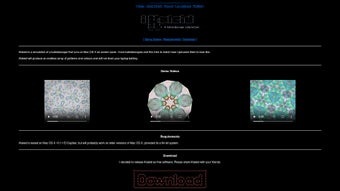
iKaleid is a dynamic screen‑saver application crafted exclusively for macOS users who crave a blend of art and technology on their idle displays. Unlike traditional screen savers that simply cycle through static images, iKaleid generates vibrant kaleidoscopic patterns in real time, delivering smooth, high‑definition animations that respond to the system’s graphics engine. The software is completely free, making it an attractive option for anyone looking to personalize their workspace without adding a subscription cost.
Its intuitive interface allows users to dive straight into the visual experience, while still offering a deep set of customization options for those who enjoy tweaking parameters such as color palettes, symmetry levels, and animation speed. Whether you’re a designer seeking a creative backdrop, a developer wanting a subtle yet engaging idle screen, or simply a Mac owner who loves eye‑catching aesthetics, iKaleid transforms a dormant monitor into a living canvas. Because the program runs efficiently on modern Mac hardware, it does not tax CPU or GPU resources, ensuring that the screen saver remains smooth even on older MacBook models.
The free nature of iKaleid, combined with its sleek design and low‑impact performance, makes it a compelling addition to the macOS ecosystem. In the sections that follow, we’ll explore its core features, walk through the installation process, discuss system compatibility, weigh the pros and cons, and answer the most common questions users have about this artistic tool.
Key Features That Set iKaleid Apart
- Real‑time Kaleidoscopic Rendering – Generates ever‑changing geometric patterns that evolve smoothly, creating an endless visual loop.
- Customizable Color Schemes – Choose from preset palettes or define your own RGB values for a truly personalized look.
- Adjustable Symmetry & Complexity – Control the number of mirrors, rotation speed, and pattern density to match your aesthetic preference.
- Low‑Resource Footprint – Optimized for macOS, the screen saver runs efficiently on both Intel and Apple Silicon Macs without noticeable performance drops.
- Seamless Integration with macOS – Appears in the standard Screen Saver preferences pane, allowing you to enable or schedule iKaleid alongside native macOS options.
- Automatic Updates – The application checks for new releases and updates silently, ensuring you always have the latest visual enhancements and bug fixes.
- Free and Open‑Source Licensing – No hidden fees, trial periods, or premium tiers; iKaleid is completely free for personal and commercial use.
- Multi‑Display Support – Extends the kaleidoscopic experience across multiple monitors, maintaining synchronization for a cohesive look.
- Responsive to System Idle Time – Starts automatically after your chosen inactivity period, respecting your power‑saving settings.
Installation & Usage Instructions
Getting iKaleid up and running on your Mac is straightforward, even for users with limited technical experience. Follow these steps for a hassle‑free installation:
- Download the Installer – Visit the official iKaleid website or the trusted Mac App Store link. Click the “Download iKaleid” button, which will retrieve a
.dmgfile (approximately 12 MB). - Open the Disk Image – Double‑click the downloaded
.dmgfile. macOS will mount a virtual drive on your desktop, revealing the iKaleid application bundle. - Copy to Applications – Drag the iKaleid icon into your
/Applicationsfolder. This step ensures the app receives the appropriate permissions and can be accessed from the Launchpad. - Grant Security Permissions – The first time you launch iKaleid, macOS may prompt you to allow the app to control your screen saver settings. Open System Settings → Security & Privacy → Privacy → Screen Recording (or “Accessibility” on older macOS versions) and add iKaleid to the allowed list.
- Activate iKaleid – Open System Settings → Desktop & Screen Saver → Screen Saver. Locate “iKaleid” in the list of available screen savers and select it. Adjust the “Start after” timer to your preferred idle duration.
- Customize Your Experience – Click the “Options” button next to iKaleid in the screen saver pane. Here you can fine‑tune color palettes, symmetry, animation speed, and enable multi‑display sync. Changes are previewed instantly in the preview window.
- Enjoy the Visuals – Once configured, step away from your Mac or lock the screen. iKaleid will activate automatically, delivering a hypnotic kaleidoscopic display that transforms idle time into an artistic showcase.
If you ever need to revert to the default macOS screen saver, simply return to the Screen Saver settings and select a different option. Uninstalling iKaleid is equally simple: drag the application from the /Applications folder to the Trash, and optionally remove the associated preference files located in ~/Library/Preferences/com.iKaleid.plist.
Compatibility, Pros & Cons
iKaleid is built for macOS 10.13 (High Sierra) and later, covering a broad range of devices from older Intel‑based MacBooks to the latest Apple Silicon Macs (M1, M2, and beyond). The application automatically detects the underlying hardware architecture and optimizes rendering accordingly, guaranteeing a fluid experience whether you’re on a 13‑inch MacBook Air or a 27‑inch iMac.
Pros
- Completely free with no hidden in‑app purchases.
- Stunning, real‑time kaleidoscopic visuals that are highly customizable.
- Lightweight performance; runs smoothly even on older Mac hardware.
- Native integration with macOS Screen Saver preferences.
- Supports multiple monitors and maintains synchronization across displays.
- Regular automatic updates keep the software fresh and secure.
Cons
- Limited to macOS – no Windows, Android, or iOS versions are available.
- Advanced users may desire deeper scripting or API access, which is currently unavailable.
- Customization options, while extensive, are confined to visual parameters; there is no audio component.
Overall Rating: 4.6 / 5
The free price tag, high‑quality visuals, and low system impact make iKaleid a top‑tier screen saver for Mac users seeking both style and performance.
Frequently Asked Questions
Is iKaleid truly free, or are there hidden costs?
iKaleid is 100 % free for personal and commercial use. There are no premium tiers, subscription fees, or in‑app purchases. All features are available to every user after download.
Can iKaleid run on Apple Silicon Macs without Rosetta?
Yes. iKaleid includes native Apple Silicon binaries, so it runs natively on M1, M2, and later chips. This ensures optimal performance and lower power consumption compared to running under Rosetta.
How much CPU/GPU resources does iKaleid consume?
The application is designed to be lightweight. In typical usage, iKaleid occupies less than 5 % of CPU and a modest portion of GPU memory, making it safe to run on laptops while charging or on desktop machines without affecting other tasks.
Can I use iKaleid on multiple monitors simultaneously?
Absolutely. iKaleid detects all connected displays and renders synchronized kaleidoscopic patterns across each screen. You can enable or disable individual monitors in the options panel.
Is there a way to schedule iKaleid only during certain hours?
While macOS does not provide a native hourly schedule for screen savers, you can combine iKaleid with the built‑in “Energy Saver” settings or use third‑party automation tools (e.g., Keyboard Maestro) to enable or disable the screen saver at specific times.
Conclusion & Call to Action
iKaleid delivers a vibrant, customizable, and resource‑friendly screen‑saver experience that feels both modern and artistic. Its free distribution, seamless macOS integration, and support for both Intel and Apple Silicon hardware make it an excellent choice for anyone who wants to add a touch of creativity to idle moments. Ready to transform your Mac’s blank screen into a living kaleidoscope? Download iKaleid now and enjoy a fresh visual treat every time your computer goes idle.







